Yearly forest dynamics from 2000 – 2017
step 1: add the area of interest
// set the area of interest
var chl = ee.FeatureCollection("users/servirmekong/Vietnam/CHL_Boundary").geometry();
print("the total area is:",chl.area())
step 2: import the tree canopy cover and tree height image collections
// import tree height
var th  = ee.ImageCollection("projects/servir-mekong/yearly_primitives_smoothed/tree_height");
// import tree canopy cover
var cc = ee.ImageCollection("projects/servir-mekong/yearly_primitives_smoothed/tree_canopy");
step 3: Set the thresholds
// Forest definitions
// Tree canopy greater than (%)
var ccThreshold = 10;
// Tree height greater than (meters)
var thThreshold = 5;
// minimum mapping unit
var mmu = 5;
step 4: Create a list with the years of interest
var years = ee.List.sequence(2000,2017,1)
step 5: create a forest cover timeseries
<span id="mce_SELREST_start" style="overflow:hidden;line-height:0"></span>
var forestCollection = ee.ImageCollection(years.map(function(year){

// set year of interest
var startDate = ee.Date.fromYMD(year,1,1);
var endDate = ee.Date.fromYMD(year,12,31);

// get image for the year
var thImage = ee.Image(th.filterDate(startDate,endDate).first());
var ccImage = ee.Image(cc.filterDate(startDate,endDate).first());

// Set the thresholds of the image
var treeheight = thImage.gt(thThreshold);
var canopy = ccImage.gt(ccThreshold);

// create the forest layer
var forest = treeheight.add(canopy).eq(2);
forest = forest.mask(forest);

// apply the minimum mapping unit
var map = forest.connectedPixelCount(mmu+2).gte(mmu);
return map.set("system:time_start",thImage.get("system:time_start"))
}))
step 6: Set the dates for the baseline and study period.
var baselineStartDate = ee.Date.fromYMD(2005,1,1);
var baselineEndDate = ee.Date.fromYMD(2005,12,31);

var startDate = ee.Date.fromYMD(2010,1,1);
var endDate = ee.Date.fromYMD(2010,12,31);
step 7: Select baseline and target image and display them.
var baseline = ee.Image(forestCollection.filterDate(baselineStartDate,baselineEndDate).first();
var image = ee.Image(forestCollection.filterDate(startDate,endDate).first());

Map.addLayer(baseline,{palette:"darkgreen"},"forest 2005")
Map.addLayer(image,{palette:"darkgreen"},"forest 2010")
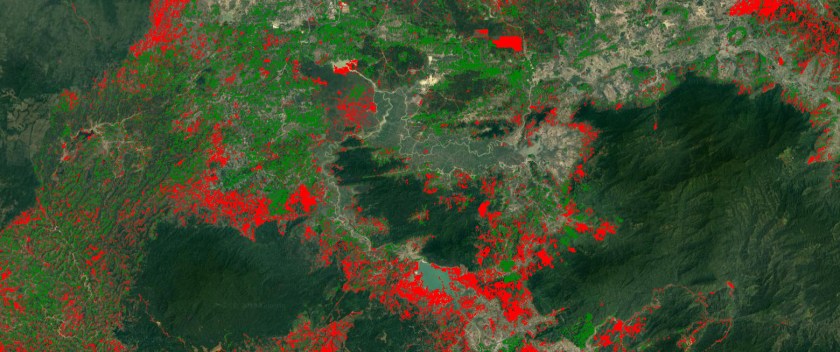
step 8: Calculate the gain and loss and them them to the map.
baseline = baseline.unmask(0);
image = image.unmask(0);

var lossGain = image.subtract(baseline)

lossGain = lossGain.updateMask(lossGain.neq(0)).clip(chl)
Map.addLayer(lossGain,{min:-1,max:1,palette:"red,green"},"loss and gain")
 Open Geo Blog
Hello, can you help me to understand why my landtrend model doesnt run”?
https://code.earthengine.google.com/89a87a291a12aad3d0e6403d94c313fc
LikeLike